Order of Service
Funeral Order of Service Insert
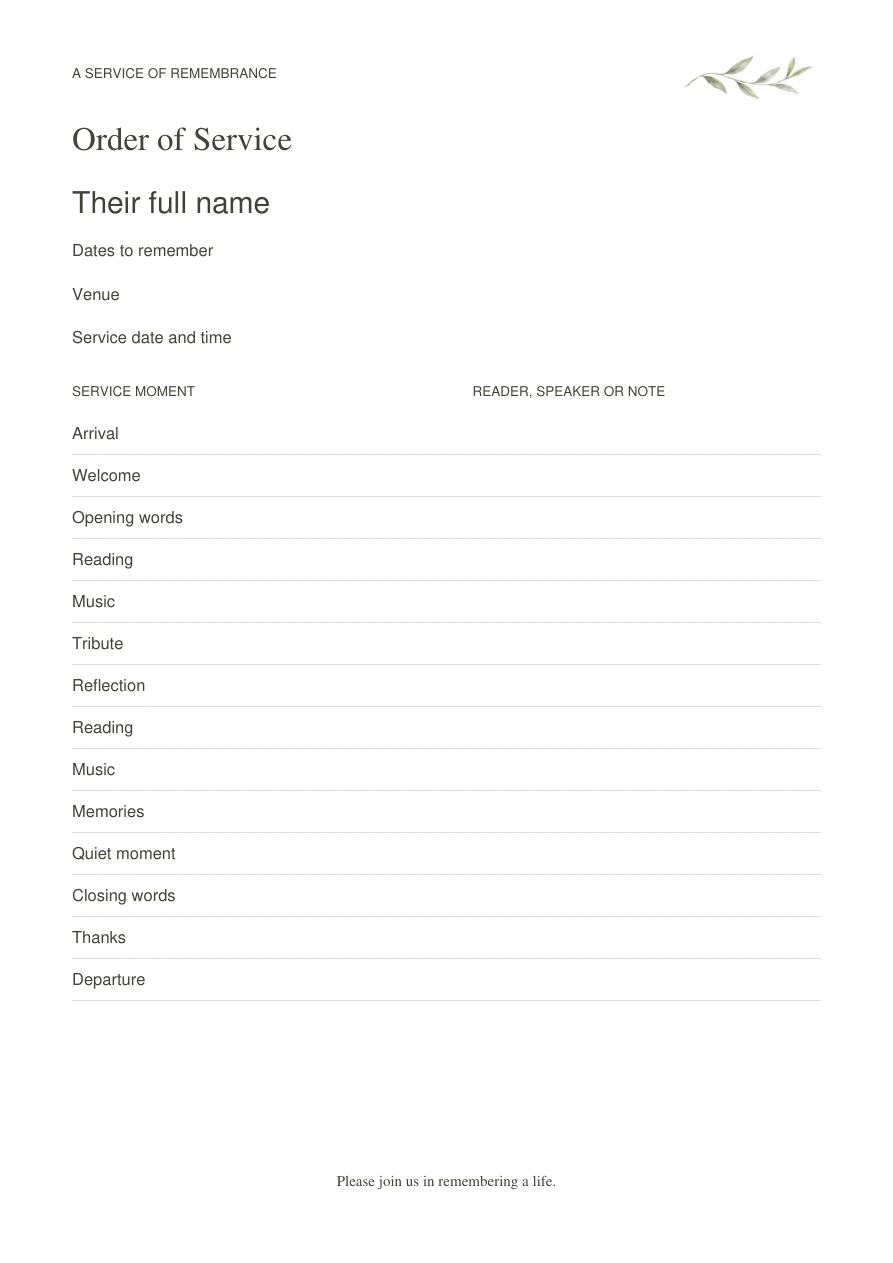
A simple service sheet with 32 editable text fields
Paused
Checkout is paused while the customer download files are verified.
- A4 and US Letter PDFs, one page each, plus clear start-here instructions
- 32 separate typing fields for the header, fourteen service moments and fourteen speakers or notes
- Light olive-branch artwork and a simple portrait layout
- Fixed artwork and layout; no photo-upload field
Simple on the hardest week
How the revised files will work.
Personalise
Use desktop Acrobat Reader to change the text fields. Save, close and reopen the file to check your changes.
Follow the instructions for this product and your printer. Use matching paper and test one copy at 100% scale.
Keep
Check the printed details and size before cutting, folding or making more copies.
What’s included
A clear package, ready when you need it.
How to use it
Use free desktop Adobe Acrobat Reader to replace every sample label or clear unused fields. Confirm the order with the service leader. Save with a new name, close and reopen the saved PDF, and check all fields. Print portrait, one-sided, at Actual size / 100% on matching paper. This is a full-page insert, not a folded program. Follow your printer instructions for paper weight and test one sheet first. The name, dates, venue, service date, all fourteen items and all fourteen speaker fields are independently editable. Artwork, type styles and layout stay fixed. Print as many copies as the service needs.
Delivery
Checkout remains paused while physical printing and independent use are checked. The revised digital ZIP contains A4 and US Letter PDFs and start-here instructions. No physical product ships.
Quiet answers
Good to know.
What is in the download?
One ZIP with two one-page PDFs, in A4 and US Letter, plus start-here instructions. Checkout remains paused while print and first-use checks are completed.
What can I edit?
Each PDF has 32 separate typing fields: name, dates, venue, service date, fourteen service moments and fourteen speaker or note fields. Clear any fields you do not need. Artwork, headings and layout stay fixed; there is no photo field.
How do I edit and save?
Use free desktop Adobe Acrobat Reader. Replace the sample labels, save with a new name, then close and reopen that file. Check every field. Browser and phone PDF viewers vary.
How do I print it?
Choose the file matching your paper. Print portrait, one-sided, at Actual size / 100%. Check one sheet first. This is a full-page insert, not a folded program.
Can I make copies?
Print as many copies as the service needs. Confirm the wording and order with the service leader first.
You may also need